Product details
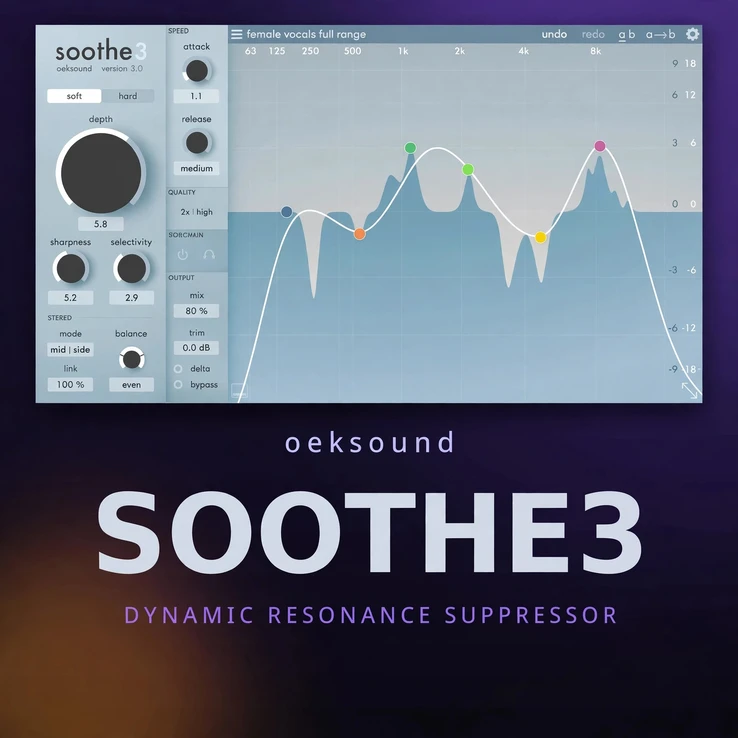
oeksound soothe3 mac is a dynamic resonance suppressor for Mac. It listens to your audio in real time. It finds harsh and muddy resonances. Then it reduces only those problem spots. The rest of your sound stays intact.
Contents
- Why oeksound soothe3 mac works so well
- Soft and Hard modes
- Low-latency tracking for live use
- Multichannel support up to 9.1.6
- The Detail knob
- Key features
- System requirements
- Frequently asked questions
Many mixes suffer from sharp peaks. Vocals can sound sibilant. Guitars can ring in the upper mids. Cymbals can bite too hard. Static EQ can dull the whole track. Soothe3 works in a smarter way. It reacts only when a resonance rises. It leaves the good parts alone.
Use it on vocals, guitars, drums, synths, and full mixes. Use it on dialogue and podcasts too. It cleans up harshness without a flat or lifeless result. Your tracks stay clear, warm, and natural.
If you used the earlier version, compare it with oeksound soothe2 on this store.
Why oeksound soothe3 mac works so well
oeksound soothe3 mac scans the full frequency range. It detects resonances as they move. It applies gentle cuts where they are needed most. The cuts follow the sound. They do not sit in one fixed place.
You set the depth and the range. Soothe3 does the fine work for you. It is fast to set up. It is easy to hear. Small moves often make a big difference.
The result is a smoother mix. Harsh peaks fade away. Clarity stays. Detail stays. Your vocal sits better in the mix. Your instruments blend with less effort.
Soft and Hard modes in oeksound soothe3 mac
oeksound soothe3 mac gives you two main modes. Soft mode is gentle and smooth. It suits vocals, acoustic guitars, and delicate sources. It tames harshness with a light touch. It keeps the tone open and natural.
Hard mode is firmer and more direct. It suits harsh synths, distorted guitars, and bright drums. It controls strong resonances with more force. It still aims to keep the sound musical.
Switch between the modes to test the feel. Soft mode often works best first. Hard mode helps when the source is very bright. Both modes use the same smart detection. You choose how firm the result should be.
Low-latency tracking for live use
oeksound soothe3 mac includes a low-latency mode for tracking. It lets you record with Soothe3 in the chain. The delay stays very low. You can monitor vocals while you record. You can hear a cleaner sound right away.
This mode suits live sessions and vocal tracking. It also suits fast mix decisions. You do not need to wait for a slow render. You hear the change as you play.
Use the standard mode for detailed mixing. Use low-latency mode when timing matters most. Both modes keep the same clear sound. You choose the mode that fits the job.
Multichannel support up to 9.1.6
oeksound soothe3 mac is not limited to stereo. It supports multichannel formats up to 9.1.6. That makes it useful for film, TV, and immersive audio. You can treat wide mixes with the same care as a stereo track.
Resonances can build up across many channels. Soothe3 can control them across the full field. The sound stays balanced. The image stays stable. Dialogue stays clear in large formats.
It also works well on buses and stems. Use it on a vocal bus. Use it on a drum bus. Use it on a full mix. Each use keeps the tone natural.
The Detail knob in oeksound soothe3 mac
The Detail knob sets how fine the detection is. A higher Detail value finds narrow peaks. A lower value treats broader areas. This gives you real control over the result.
Use more Detail for sharp whistles and ringing tones. Use less Detail for broad harshness and mud. Small changes can shift the sound a lot. Listen as you turn the knob.
Combine Detail with depth and range. You can target one problem area. You can also treat the whole spectrum. The display shows what Soothe3 hears. You can see the peaks as they rise and fall.
Key features
- Dynamic resonance suppression that acts only when needed
- Soft and Hard modes for gentle or firm control
- Low-latency mode for tracking and live monitoring
- Multichannel support up to 9.1.6 for immersive formats
- Detail knob for fine or broad resonance control
- Clear visual display of resonances in real time
- Works on vocals, instruments, buses, and full mixes
- Fast setup with natural and musical results
System requirements for oeksound soothe3 mac
This is the Mac-only version. It runs on macOS 10.14 through macOS 27. It supports Apple Silicon natively. It also runs on Intel Macs.
Formats: VST3, AU, and AAX. Use it in your Mac DAW of choice. An iLok account is required for activation. iLok is also used for license management. See the official Oeksound site for more detail on Soothe3.
Check your DAW for the latest format support. Keep macOS up to date for best results. A stable host and a modern Mac give the smoothest performance.
Frequently asked questions
Is oeksound soothe3 mac only for vocals?
No. It works well on vocals. It also works on guitars, drums, synths, dialogue, and full mixes.
What is the difference between Soft and Hard modes?
Soft mode is gentle and smooth. Hard mode is firmer and more direct. Both modes use the same detection. You choose the strength that fits the source.
Can I use oeksound soothe3 mac while tracking?
Yes. Use the low-latency mode for tracking. It keeps delay very low. You can monitor a cleaner sound while you record.
Does oeksound soothe3 mac support immersive audio?
Yes. It supports multichannel formats up to 9.1.6. That makes it useful for film, TV, and immersive mixes.
Do I need iLok?
Yes. An iLok account is required. Use it to activate and manage your license.




There are no reviews yet.