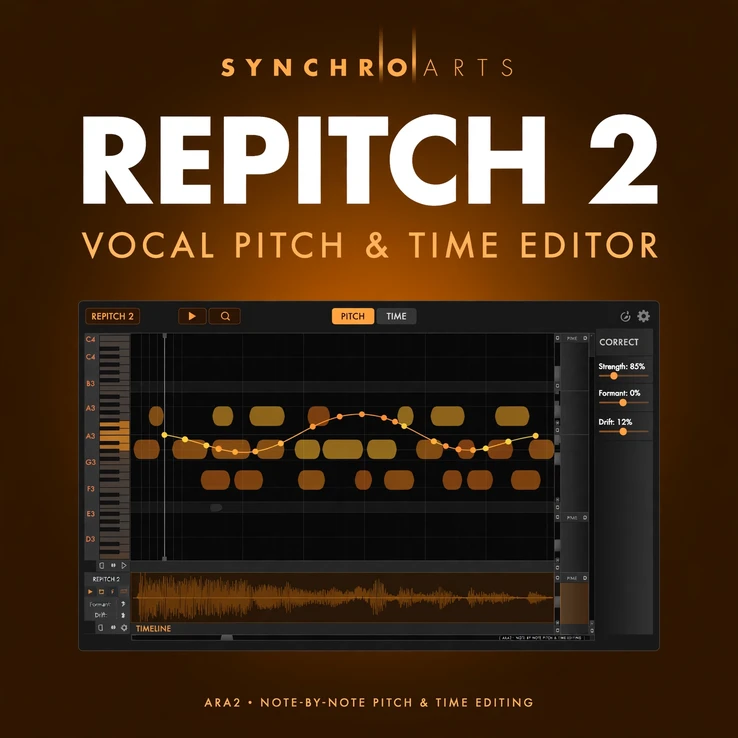
Product details
The Synchro Arts RePitch 2 plugin brings hands-on vocal pitch and time editing to Mac & Windows. Shape each note by hand, fix timing, and keep vocals natural — with ARA2 support that puts the editor right inside your DAW.
What you get:
- Pitch editing note by note — tune, move and shape vocals with full control
- Time editing to tighten phrasing and correct timing cleanly
- ARA2 integration for a fast in-DAW editing workflow
- Natural, artifact-free results that keep the vocal’s character
- Mac & Windows, AU / VST3 / AAX, Intel and Apple Silicon
System requirements: macOS 11 or later, Windows 10 or later (64-bit); AU, VST3 or AAX 64-bit host; iLok account needed for activation (no physical iLok key). Yours for €49.99 (regular €149).
Why Choose the Synchro Arts RePitch 2 Plugin for Vocal Pitch Editing?
The Synchro Arts RePitch 2 plugin gives you direct, hands-on control over every note in a vocal performance. Instead of relying on automatic correction alone, you can listen, look at the pitch of each note, and make precise adjustments that keep the singer sounding like the singer. That control makes it a trusted choice for lead vocals, backing vocals, harmonies and doubled parts alike.
Pitch is only half of a convincing vocal edit. Timing matters just as much, and RePitch 2 lets you tighten phrasing, move notes in time and smooth out small timing slips without cutting the audio into pieces or rebuilding a take. The result is a vocal that sits better in the mix, with its natural phrasing and character intact.
Because the plug-in works with ARA2, the editor opens right inside your DAW. There is no need to transfer audio back and forth or to work in a separate window for every small change. You can edit, listen in context and keep working on the song, which makes vocal editing faster and far less disruptive to your creative flow.
How the Synchro Arts RePitch 2 Plugin Works in Your DAW
Open the Synchro Arts RePitch 2 plugin on a vocal track, and ARA2 brings the audio straight into the editor. Each note appears on a pitch display, so you can see exactly where the pitch sits, where it moves and where it needs help. Tune a single note, reshape a vibrato, or adjust the pitch curve of a phrase, all with the same simple tools.
RePitch 2 is built for transparent results. Small corrections stay inaudible, and larger changes still sound musical because you control how far each note moves and how the transition between notes behaves. That makes it equally useful for gentle polish on a strong vocal and for more detailed repair work on a difficult take.
Use it for lead vocals, backing vocals, harmonies and vocal doubles. It is a practical everyday tool for singers, producers and mix engineers who want vocals that sound finished, natural and in tune, without the artificial edge that heavy automatic processing can leave behind. Learn more about the developer at Synchro Arts, and browse more vocal and effect tools in the AudioTools store.
Compatibility: Mac & Windows, AU, VST3 and AAX
The Synchro Arts RePitch 2 plugin runs on both Mac and Windows, so the same licence covers your studio computer and your laptop, whatever platform you work on.
- macOS 11 or later, Intel and Apple Silicon
- Windows 10 or later, 64-bit
- AU, VST3 and AAX 64-bit plug-in formats
- ARA2-compatible DAW for the integrated in-DAW editor
- iLok account needed for activation (no physical iLok key required)
Check that your DAW supports ARA2 to get the fastest in-DAW workflow, and keep your system up to date for the best performance with the plug-in.
Frequently Asked Questions About the Synchro Arts RePitch 2 Plugin
Does the Synchro Arts RePitch 2 plugin work on Mac and Windows?
Yes. It is available for both Mac and Windows, in AU, VST3 and AAX formats, for Intel and Apple Silicon Macs.
Do I need a physical iLok key?
No. You need an iLok account for activation, but no physical iLok key is required. See iLok for account details.
What is ARA2, and do I need it?
ARA2 is the technology that lets the Synchro Arts RePitch 2 plugin open its editor directly inside a compatible DAW, so you can edit pitch and time without transferring audio. It is not a requirement for every host, but it gives the fastest workflow in DAWs that support it.
How will I receive the Synchro Arts RePitch 2 plugin?
After your order, delivery is by email. You will receive the licence and activation details for your iLok account, so you can install and activate the plug-in on your Mac or Windows computer.
Is RePitch 2 suitable for natural-sounding correction?
Yes. It is designed for natural, artifact-free results, so tuned vocals keep their character and small corrections stay transparent in the mix.

There are no reviews yet.