Product details
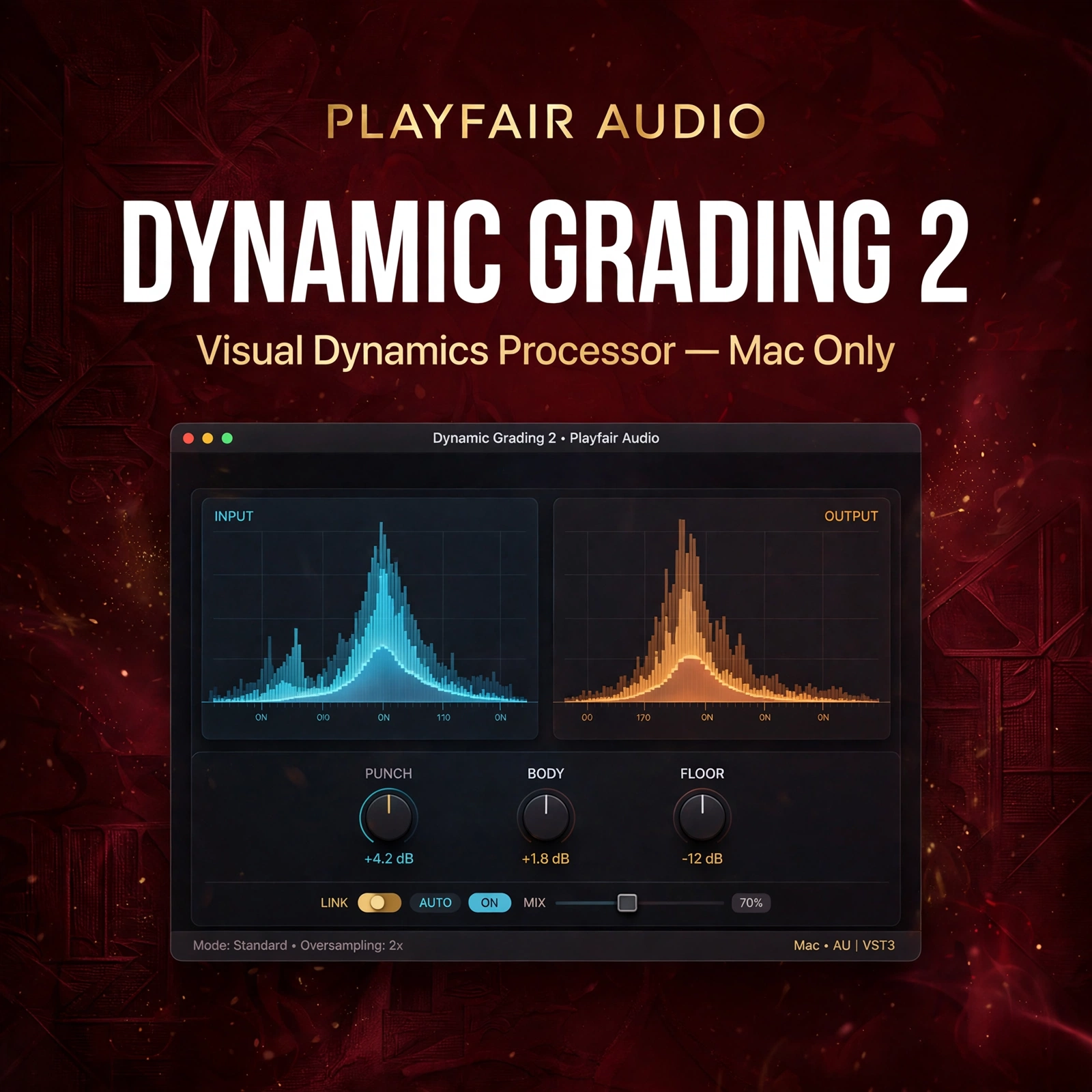
Download Playfair Audio Dynamic Grading 2 for Mac and rethink what a dynamics processor can be. Instead of a threshold you cannot see, Dynamic Grading 2 shows you the signal: dynamic histograms plot how often each loudness level occurs, live, for the input and the output.
Two thresholds split the picture into three regions — Punch for attacks and transients, Body for sustain and harmony, Floor for decay, room and noise — and each region is compressed or expanded independently. It is compression and expansion with the guesswork removed.
The plug-in was designed from first principles around how humans perceive dynamics, and it shows in the workflow. Drag the source markers to set the ranges, or let Source Learn analyse a representative passage and propose them.
Shape the target with the control handles on the graph or with the ratio and gain knobs in the centre — version 2’s Hybrid Interface offers both, so adjustments are fast and precise. Watch the output histogram and the curve display confirm the change. Fine-tune with the Spectrum parameter, timing controls and Amount, then compare with reference compare and save the setting as a preset.
Playfair Audio Dynamic Grading 2: what each region does
Punch holds note onsets, transients and attacks. Compress it to tame peaks and push a track back in the mix; expand it to bring attacks forward and create depth between tracks. Body holds notes, sustain and harmony — the bulk of most signals. Compress it to even out performances and increase presence in a busy mix; expand it to create space and enhance groove.
Floor holds reverberation, echo, decay and background noise. Expand it to dereverberate, reduce noise or gate a drum room; compress it to exaggerate ambience and create pumping, artistic effects. Because the regions are processed independently, fixing one never damages another.
The two-threshold system is the key: the thresholds define the body range, everything above is punch, everything below is floor, and the boundaries can be set by hand or by Source Learn.
Inverse ratios in every block mean expansion is available wherever compression is. The Time Window, set in bars relative to tempo, governs the histogram analysis, and histogram computation accelerates automatically while parameters change so the picture keeps up with the hands.
Fine-tuning: Spectrum, timing, Amount and the Magic Eye
The sidebar is where good settings become great ones. The Spectrum parameter applies noise-weighted sidechain filtering, guided by the Magic Eye display — a visual aid that makes spectrum adjustments unusually legible.
Timing Refinement controls Response and Release, shaping the timing of the processing so pumping or shakiness can be designed out rather than accepted. The Amount control scales the entire effect without moving the handles or diluting it the way a mix control would. Latency options, a zoom/scroll bar for the visible dynamic range, a resizable interface, undo/redo and reference compare round out a tool built for daily use on every track.
Version 2.1, the current version and a free update for all Dynamic Grading 2 owners, adds a peak limiter at the output and listen modes that solo the punch alone or the punch and body together, so threshold decisions can be heard in isolation.
Presentation latency compensation keeps meters and histograms in sync with the audio in AU and VST3, even behind latency-heavy plug-ins. Multichannel support runs to 9.1.6 with a continuously variable channel link for immersive and cinematic work.
System requirements for the Playfair Audio Dynamic Grading 2 download on Mac
This download covers Mac only; the Windows version is not included. Dynamic Grading 2 runs as a 64-bit AU, VST3 or AAX plug-in on macOS 10.15 or later, natively on Apple Silicon and Intel, requiring a 2 GHz CPU and 4 GB of RAM in any compatible 64-bit host.
Channels from mono to 16 are supported. Licensing runs through a Playfair Audio account with up to four activations per licence, offline activation available and no dongle required.
A fully functional 14-day trial is available from the official Playfair Audio page. Anything not confirmed here should be checked on the official Playfair Audio page before buying.
Frequently asked questions about the Playfair Audio Dynamic Grading 2 download
Is this download for Mac only? Yes — Mac only. The Windows version is sold separately by Playfair Audio and is not included in this download.
What formats does it run in? AU, VST3 and AAX, 64-bit only, in any compatible host on macOS 10.15 or later.
What is new in version 2.1? A peak limiter at the output, listen modes for isolated auditioning, presentation latency compensation in AU and VST3, and Playfair Audio account licensing with up to four activations.
Can it really replace a compressor, expander and gate? For most tracks, yes — the three regions cover compression, expansion, gating-style floor control and transient shaping in one coherent model.
Is there a trial? Yes — a fully functional 14-day trial is available from the official Playfair Audio page.
Download Playfair Audio Dynamic Grading 2 for Mac, €39.99 instead of €99: see the dynamics, grade them region by region, and hear the mix fall into place.
There are no reviews yet.